Category: Debwork Blog

  • CSS to Fix Twitter Widget Overlap

    CSS to Fix Twitter Widget Overlap

    Twitter does not want you to use a narrow column but here is how you can put the Twitter widget into a narrow space on your html site. WordPress has various widgets that you can experiment with.

    #twitter-widget-0, #twitter-widget-6 {
        min-width: 175px !important;
        width: 175px !important;
    }
    See it working on my client’s html site:  Change In Motion Healing Arts
  • Valentines Day is great for social media

    Valentines Day is great for social media

    Last night I had a ‘vision’ to morph this round tin into a heart-shaped one for Valentines Day.  This achievable goal was not to be suppressed;  I had some Photoshop fun today!

    Some holidays are great for social media.

    Shameless but fun promotion of my web client MooBuzz® !

  • Waste of a good URL

    Waste of a good URL

    Well, it’s my birthday today and when people ask me about the joy of the day and I tell them, they are sorry they asked. It’s like one of those classic Holiday Letters – “Billy broke his arm, our house needs a new roof, and I am having my gallbladder removed while I write this Merry Christmas letter to you.”

    So I decided to stop answering the phone and on a whim checked out the website www.WorstBirthdayEver.com; surely someone has set it up and today it could be quite entertaining. Aha! someone has indeed! They paid for the domain and created that site! “OK! Show me some bad birthdays!”  Unfortunately, they made one post (not even about birthdays) and then abandoned the effort. Well, maybe that is a fitting irony, but what a waste of a good URL! So much so that I’m not even giving them a live link here.

    I did find this slide show of days that make mine seem not so bad. Thanks, HuffPo!

    Huffngton Post slideshowWell, it is the year of the bad flu virus and I have it,

    plus it is Friday,

    plus my tooth broke,

    since I can’t stop coughing I have to wait a week go to the dentist,

    plus no one wants to hear about such things when making a birthday call.
    My sister-in-law said “If I wanted to hear that kind of news, I would have called my mother!” … a glaze falls over the cheering crowd.

    So that’s my story which will be irrelevant in just one little week – but a bad use of url!? That is held up for years – that really stinks.


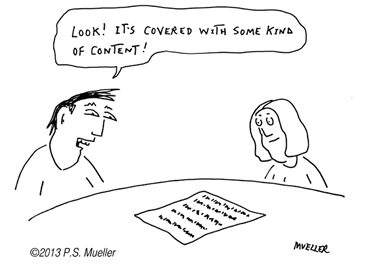
  • Still Writing on Paper?

    Still Writing on Paper?

    Don’t worry…

    If this form of content looks all too familiar I’ll get it on the internets for you!

    (Posted just for some Friday Fun. Image courtesy of:  PS Mueller, funny guy in my Madison neighborhood)

  • Mouse hover events R.I.P.

    Mouse hover events R.I.P.

    I thus far failed to convince a web client to change their main graphic menu that makes sense only with a hover event. Apple’s iProducts (iPhone, iPad, iMini, etc) has killed the thrill of hover (mouse over) actions. This article from Design Shack agrees and nicely lays it out what is going on here.

    What is a mouse hover? When you move your mouse without clicking it – the graphic switches out.

    Read the article.

  • Another example – Facebook Phishing

    Another example – Facebook Phishing

    I previously commented on LinkedIn Phishing and today a very real looking Facebook notification appeared. I worry about you so I thought I’d publish this again.

    How to detect if an email notification is legit or phishing:

    Hover over the link and see where it leads.
    If that doesn’t work just go directly to the site instead of through the email message link.

  • Link love – the best pat on the back

    Link love – the best pat on the back

    Web maintenance client client Daniel R. Spirer Jewelers put a debwork.com link on his Blogspot “sites to watch” section!

    Did you know?  Links to your site = SEO GOLD. Google loves links to your site. Not junky links from ‘link farms’ but links from quality sites like this one.

    Thanks,  so much!

  • Give ’em what they want

    Give ’em what they want

    Once it awhile it is a tug between my knowledge and what a client wants. There are tons of advice articles telling web professionals to “Give ‘em what they need” with a list of good reasons including that your name is professionally associated with the site’s design and health.

    When I step off the soap box, long-winded from explaining, occasionally a client still insists on ‘their way’! My imparted knowledge about why the idea they have goes against design, user knowledge, instinct, all the articles ever written about good web sites did not persuade the site owner.

    Well in the end since I want web clients to be happy, against the tide I say “Give ‘em what they want”. Maybe they will circle back eventually to reconsider that really long page with long blocks of text or a questionable color amidst a beautiful design.

    And for the critics out there – what goes on a web site or what is out of date on a site – it’s not always the web master’s fault. Working on a site is a team effort. Primarily – the site owner decides.

    At least that’s how it works around here.

  • Watch out LinkedIn Spam Phishing

    Watch out LinkedIn Spam Phishing

    I’ve been getting some fake LinkedIn messages lately. How do you know they are fake? Hover over the accept button and see where it leads to. This one does not go to LinkedIn.

    If you can’t tell or don’t want to bother, just go directly to LinkedIn instead of through the email message link – those invitations will be all queued up for you if they are legitimate.

  • How to Stop Dreamweaver from Highlighting Entire File

    How to Stop Dreamweaver from Highlighting Entire File

    The Problem: When in Dreamweaver’s code or split view to edit html, php, css  or any file – highlight what you want to copy or edit and you get the entire page.  Open and close Dreamweaver – does not help. The editor gets stuck in some kind of mode that will not let you highlight the bit you want. It is very frustrating and time consuming.

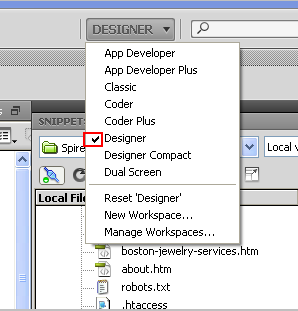
    Here is the fix:  When you first started to use Dreamweaver you chose a ‘mode’ which you may well have forgotten about.  I work in “Designer” mode, for example.

    Mode setting in upper right corner

    1. Open the drop down list and change to “Classic”
    2. Next change back to your original mode

    That’s it! You are out of your misery.

    This has been happening on and off this week and if I can save one web worker some time, it will be my random act of kindness. Thanks is owed to some forum read long ago – sorry that the URL is long forgotten to give credit.