Tag: CSS

  • Gravity Forms First Last Name Fields in Separate Lines

    Gravity Forms First Last Name Fields in Separate Lines

    In a widget, Gravity Forms name fields need full width

    How do you get first name and last name to be vertical instead of horizontal? When you are integrating with a mailing list you must have the advanced name field to map to MailChimp’s or AWeber’s database.

    Gravity forms premium support is fantastic but sometimes you don’t want to ask for help, so here is the CSS for first name and last name in a sidebar widget. The change will apply to ALL forms,  to apply to a specific form change .gform_wrapper to something like #gform_wrapper_1. Gravity forms applies a number to each form.

    .gform_wrapper .ginput_complex .ginput_right {
    float: none !important;
    width: 100% !important;
    }
    .gform_wrapper .ginput_complex .ginput_left {
    float: none !important;
    width: 100% !important;
    }

    In a widget, the email address is also too narrow in this form. To make the email field 100% width for Gravity form number 2 only (change to your form’s appropriate number):

    #gform_2 .ginput_container input.medium {
    width: 95% !important;
    }

  • Gmail Signature Add Icons No Border

    Gmail Signature Add Icons No Border

    How to Add Icon links to your Google Signature

    and remove the horrible blue border.

    I pieced this together from various sources.  Google does not provide a way to add html to your gmail signature. If you are not a geek who uses FireFox Firebug, you may as well stop reading now. If you just want an simple text signature with textual link (hotlink, hyperlink) – here is lesson #1.

    The problem: Thick blue border around your social icons in Gmail Signature:Google CSS adds 4 or 5 px border around images in gmail signature.

    #1 ADD ICON IMAGE to your Google Signature

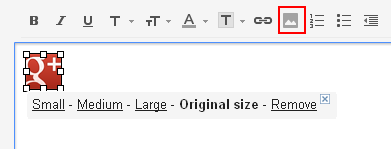
    This is pretty straight forward except you need to find an image to link to and it would be best if it was on your own web host. Click the image link, add the URL to the image.

    gmail signature add image tool

    #2 ADD LINK to the icon in your Google Signature

    The only tricky part to this is that the icon image must be clicked so you can see the small-medium-large choices underneath it and sometimes the outline in my screenshot does not show. If small-medium-large is not showing, the link tool will not work. Click on image so you see small-medium-large then click on the link tool above and add the URL link.

    Shows how you need to see small-medium-large under image in order to attach the link

    #3 REMOVE BORDER from the image in your Google Signature

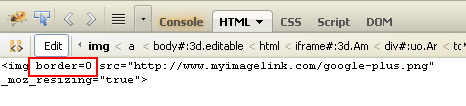
    Click on image so you see small-medium-large then click on the linkvtool above and add the URL link. Turn on FireFox Firebug>edit the IMAGE (css on  the <a> will not work.) and added “border=0″

    Shows how Firefox Firebug looks when you are editing

    #4 SAVE and TEST

    You will be surprised that this works (April 2013) because for some reason Google will save the Firebug html change even though it does not provide a way to do it within its own tool. Of course things change pretty fast around here.

    Good luck.

  • CSS to Fix Twitter Widget Overlap

    CSS to Fix Twitter Widget Overlap

    Twitter does not want you to use a narrow column but here is how you can put the Twitter widget into a narrow space on your html site. WordPress has various widgets that you can experiment with.

    #twitter-widget-0, #twitter-widget-6 {
        min-width: 175px !important;
        width: 175px !important;
    }
    See it working on my client’s html site:  Change In Motion Healing Arts